
The dilution app has two modes because a known water or concentrate amount is different from a known finished total. Choose the input before calculating the remaining quantities.
Material or water amount mode
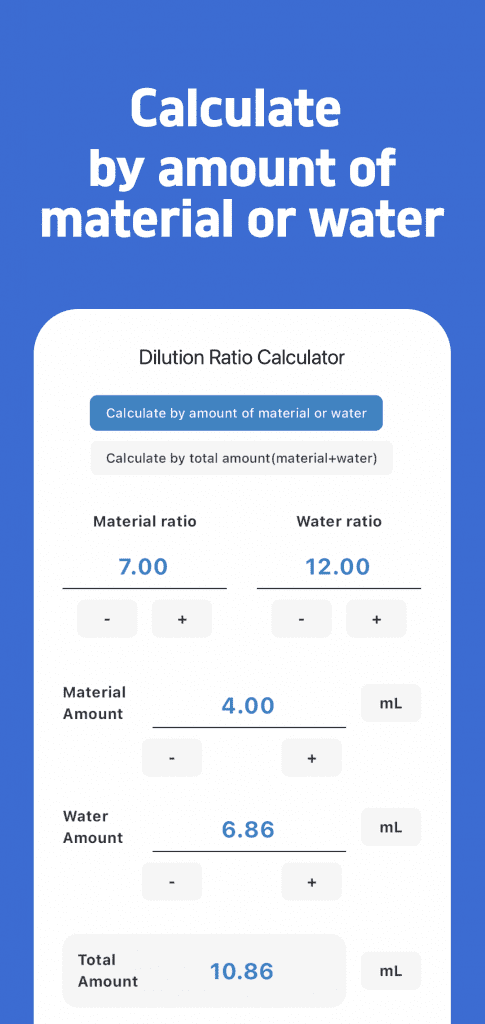
Enter the ratio and then the amount of concentrate or water already known. In the original screen below, the ratio is 7:12 and concentrate is 4 mL:
- Water = 4 × 12 ÷ 7 ≈ 6.86 mL
- Total = 4 + 4 × 12 ÷ 7 ≈ 10.86 mL
Total amount mode
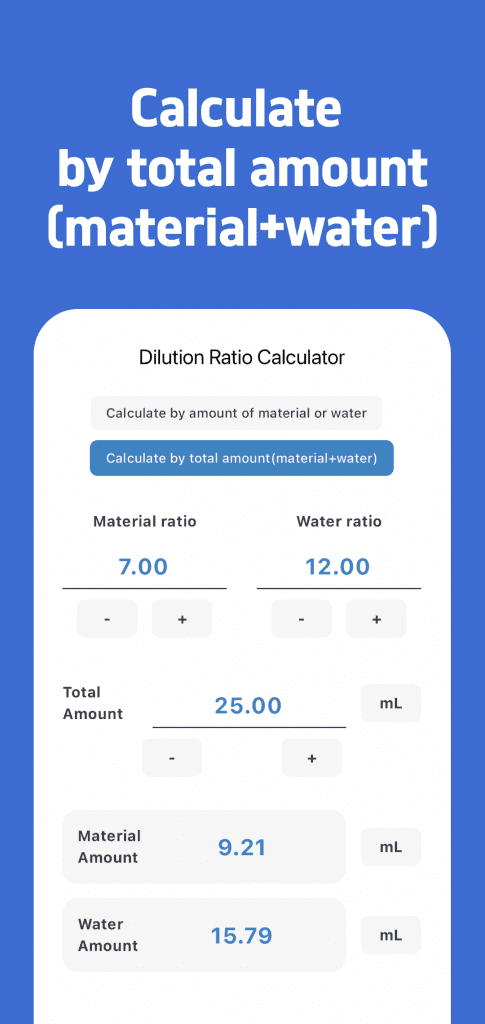
Here the input includes concentrate and water together. With 25 mL total and 7:12:
- Concentrate = 25 × 7 ÷ 19 ≈ 9.21 mL
- Water = 25 × 12 ÷ 19 ≈ 15.79 mL
The screenshots are arithmetic examples, not mixing recipes. Their values are rounded to two decimal places. Confirm the product's ratio definition, compatible units and instructions before using a calculation.
Check before saving
- Does the known amount represent concentrate, water or total?
- Are the two ratio fields concentrate and water?
- Are the entered and displayed units correct?
- Does the calculated total fit the intended quantity?
See the Dilution Ratio Calculator instructions for current unit selection and favorites. For the three formulas with one consistent example, see concentrate, water and total inputs.